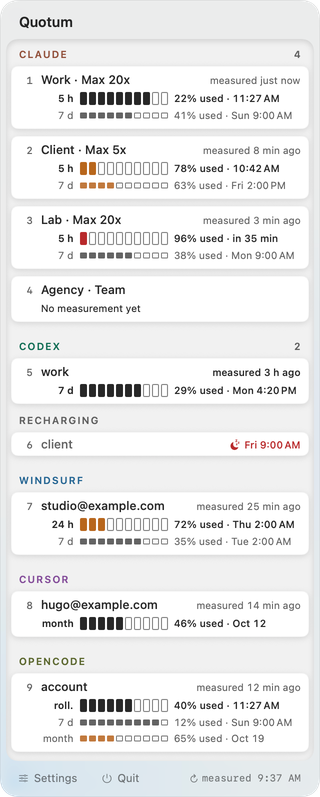
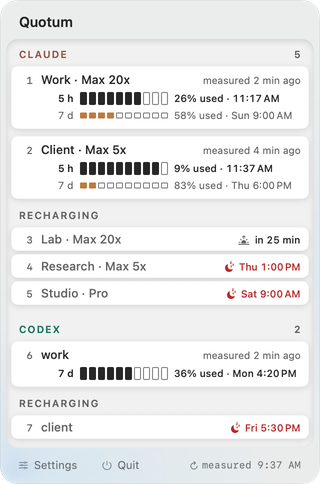
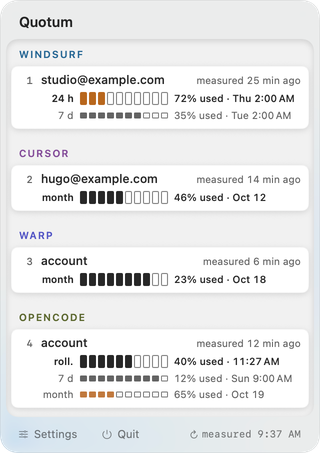
Reading a quota is the start. What you do next — open the account that still has room, in the right app, browser profile or terminal — is where these six Mac apps differ. Here is Quotum next to CodexBar, SessionWatcher, OpenUsage, Cockpit Tools and Claude Usage Tracker, each fact dated and sourced.
The short answer
All sixshow Claude and Codex usage, and handle several accounts.
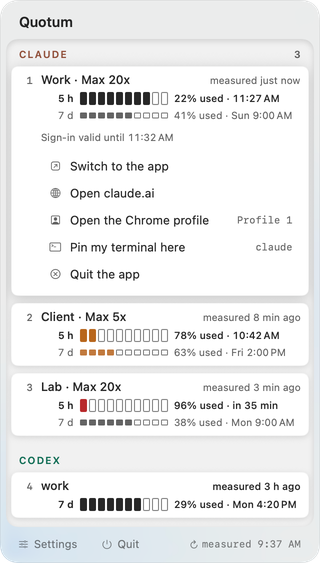
Quotumalso opens the account it measures: its desktop app, claude.ai or chatgpt.com in its Chrome profile, a terminal pinned to it[1]. It tracks no tool until you choose it[2].
The othersdepending on the tool, track more tools, are free and open source, run on older versions of macOS or on other systems, switch the active account, or keep a history — which one does what.
An account opened in Quotum: its app, claude.ai, its Chrome profile, its terminal.
Quotum next to each tool
Scroll sideways for the next tool →
Surveyed on . Every cell
links to the page it comes from; the numbers refer to the list of
sources below. These tools change often: a fact that was true on that date may no longer
be.
¹ Warp, Codebuff, Augment, opencode and Grok: one account each.
² Claude and Codex accounts, through an account app that Quotum creates.
³ Claude and Codex accounts, Chrome profile named after the account; if Chrome is already
running, Quotum says so instead of opening the profile.
“Not announced”: absent from the publisher's public documentation on the survey date, which
does not prove the feature is missing. Prices as displayed by each publisher, in its own
currency.
What Quotum adds
Each point below is a comparison with the tools named in it, on the date of the survey — not a
claim about every tool on the market.
Measurement and action on the same account, in one place. From the menu
bar, on a Claude or Codex account, Quotum opens that account's desktop app, opens claude.ai
or chatgpt.com in that account's Chrome profile, and pins a terminal to it[1]. None
of the five other tools in the table announces opening a browser profile per account.
Cockpit Tools announces app instances per account[19], and Claude Usage Tracker a
terminal per profile[21].
Warp measured without an API key. Quotum reads Warp's credentials from
the Keychain[2]. CodexBar asks for an API key[8]. SessionWatcher, OpenUsage,
ClaudeBar and Claude Usage Tracker do not list Warp among the tools they
track[13][15][21][23].
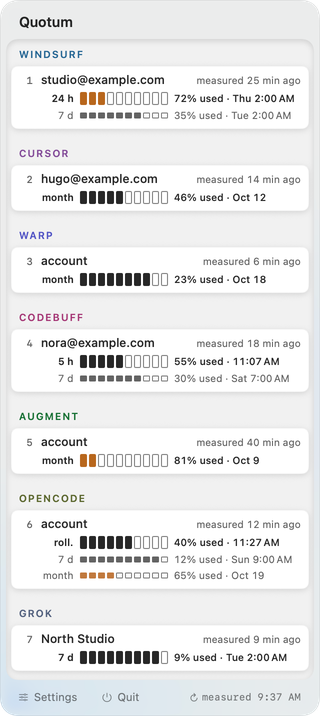
Devin Desktop (formerly Windsurf), Warp, Codebuff and Augment, on top of Claude, Codex, Cursor, opencode and
Grok[2]. Of the five other tools in the table, CodexBar covers these four as
well[5]; SessionWatcher, OpenUsage and Claude Usage Tracker list none of
them[13][15][21], and Cockpit Tools lists Devin Desktop (formerly Windsurf)[19].
No tool tracked at installation. Each tool is chosen separately; until it
is, none of its credentials is read and no request goes to it[2]. CodexBar enables
Codex by default[11]. Six local sources are read whether tools are tracked or
not — among them the end of the Codex CLI session logs, which are the transcripts of your
sessions. What Quotum reads on your Mac names all
six.
Other tools' credentials are left unchanged. Quotum reads the credentials
that other tools have stored and writes none of them[2] — which is also why it does
not switch a tool's active account. Switching means writing: CodexBar replaces Codex's
auth.json when it switches the system account[6], and Claude Usage
Tracker writes the Claude Code CLI credentials and ~/.claude/settings.json[21].
SessionWatcher also says that it reads local sign-ins read-only[13].
Price. Launch price: €4.99, then €9.99, paid once[1]. At SessionWatcher,
several accounts require Pro, at $59 one-time or $24/year[13]; Usagebar costs $9, for
Claude Code alone[26]. CodexBar, OpenUsage, Cockpit Tools and Claude Usage Tracker
are free (see below).
Codex resets: spending them automatically is an option, off by default.
Quotum shows the resets available on a Codex account and can spend one: by hand, after a
second confirmation, or without asking if you turn that setting on. In both cases, it acts only on a
measurement at most ten minutes old, when the server has observed that the quota is
exhausted[2]. Other tools do this too: Tally spends a reset on its own, with the
setting on by default[27]. In the table, SessionWatcher and OpenUsage redeem after
confirmation[14][16], and CodexBar does not redeem[6].
When Quotum is not the right choice
Other tools do more on several points. If one of them matters to you, look at the tools named
in it.
You need more tools covered. CodexBar lists 87[5], SessionWatcher
20 with Pro[13], ClaudeBar 20 according to its README[23], Cockpit Tools
16[19] and OpenUsage 11[15]. Quotum tracks 9[2].
You want a free tool, or code you can read. CodexBar, OpenUsage and Claude
Usage Tracker are free, under the MIT license[5][15][22]. ClaudeBar is free, and
its README says MIT[23][24]. Cockpit Tools is free under CC BY-NC-SA
4.0, which rules out commercial use without authorization[19]. Quotum's code is not
published[2].
Your Mac does not run macOS 26. CodexBar, SessionWatcher and Claude Usage
Tracker require macOS 14 or later[5][13][22]; OpenUsage and ClaudeBar, macOS 15 or
later[18][23]. Quotum requires macOS 26 or later[1].
You also work on another system. CodexBar has a Linux app and a command-line
tool[5]; SessionWatcher has a Windows version and an iPhone app in beta[13]; Cockpit
Tools runs on Windows and Linux[19]. Quotum is a Mac app.
You want the tool to switch the active account for you, automatically if
needed. CodexBar does it for Codex[6]; Claude Usage Tracker[21],
Cockpit Tools[19] and claude-swap[25] do it as well. Quotum does not change
any tool's active account.
You have several Warp, Codebuff, Augment, opencode or Grok accounts. Quotum handles several
accounts for 4 of its 9 tools — Claude, Codex, Cursor and Devin Desktop (formerly Windsurf); Warp, Codebuff, Augment,
opencode and Grok get one line each[2].
You want a history, costs or widgets. CodexBar has costs, charts and
widgets[5]; SessionWatcher Pro, 90 days of history and widgets[13]; OpenUsage, local
spend[15]; Claude Usage Tracker, history and API costs[21]. Quotum has none of
these.
You want to see Claude or Grok resets. CodexBar shows Claude's saved resets
through its web source, and Grok's coupons[9]; SessionWatcher shows Claude's
saved resets[14]. Quotum shows Codex resets, not Claude's or Grok's.
You use another browser than Chrome, or keep Chrome open. Opening an
account's browser profile works with Google Chrome alone, and not while Chrome is already
running: Quotum then says so instead of opening the profile[3].
How we compared
We read each publisher's public pages — website, README, documentation, changelog or update
feed — on , and wrote down what they
announce. Quotum's own cells come from the pages of this site.
“Not announced” means that the feature is absent from the publisher's public documentation on
that date: it does not prove that the feature is missing. “Not stated” means that the
documentation does not answer the question, and “Not verified” that we could not establish the
answer from it.
We did not run SessionWatcher: its cells rest on its website and its release notes. For
Cockpit Tools, we could not establish the minimum macOS version, whether it shows the age of a
measurement, whether its terminal launch is tied to a given account, or whether it keeps a
history or costs.
Prices are those displayed by each publisher, in its own currency, without conversion. A fact
that has changed since the survey can be reported to
contact@quotum.app.
All names belong to their owners; Quotum is not affiliated with any of them.
Quotum is at its launch price, €4.99 then €9.99, paid once, and can be tried before you pay: see Pricing,
and read the warning above the button before you buy. What it reads, file by file and address
by address, is on What Quotum reads on your Mac.