Menu bar app for macOS
Your Codex usage, per account, in the menu bar
Codex counts your work in a weekly window, and on some plans a five-hour one too. When the week runs out on a Wednesday, the job waits — unless you know another account still has room. Quotum shows the Codex windows of each of your ChatGPT accounts in the Mac menu bar, with when each resets, the resets you have in the bank, and how old each figure is.
Free trial for fourteen days, on the first two lines of the panel. Launch price: €4.99, then €9.99. macOS 26 or later.
The weekly window, and the five-hour one when there is one
Each window gets its own line: a ten-box gauge whose filled boxes show what is left, the share used, and the time it resets. The shortest window an account publishes takes the first line, in full boxes; the others follow in flat bands.
Which windows exist depends on the plan. On the Codex plans we measured in September 2026, only the seven-day window was published. When an account does publish a five-hour window, Quotum shows it on its own line; it never shows a window Codex does not publish.
An account whose week is used up folds into one line under “Recharging”, with a moon and the time it comes back, so it no longer reads like a full one.
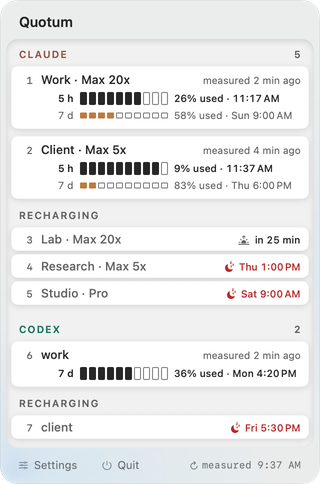
Several ChatGPT accounts, side by side
The Codex dashboard and the CLI show the account you are signed in to. Quotum lists your Codex accounts together under one heading:
- The account the Codex CLI is signed in to is measured on request, with
the sign-in the CLI keeps in
~/.codex/auth.json. - Other Codex accounts show a figure whenever one is available — for example the one their last request received through a local proxy — with its age.
- Every figure says how old it is, to the right of the account's name; past one hour, in a heavier weight.
Banked resets, shown and spent at the right moment
When a Codex account has resets available, Quotum shows them and can spend one with “Spend a reset”: by hand, after a second confirmation, or without asking if you turn that setting on. It is off by default, and in both cases Quotum acts only on a measurement at most ten minutes old, once the server has observed that the quota is exhausted. A reset once spent is lost, which is why Quotum never spends one on a guess. Everything about them: Codex resets.
Then open the right account
Open a Codex account to switch to its own copy of the ChatGPT desktop app, open chatgpt.com in its Chrome profile, or pin your terminal to it so that the Codex CLI runs on that account and resumes your last session. How the accounts stay apart: multiple accounts on one Mac.
Where the figures come from
Quotum reads the sign-in the Codex CLI already keeps on your Mac, and only once you choose to track Codex: nothing is tracked at installation. A few local sources are read whether tools are tracked or not, among them the end of the Codex CLI session logs — the transcripts of your sessions —, opened to look for the quota figures the server left there; nothing from them leaves your Mac. The full list is on What Quotum reads on your Mac.
Read this before you buy. OpenAI does not provide for a third-party app reading Codex's quota with the CLI's sign-in. The risk falls on your account, up to its suspension, and it is set out in full on the pricing page.
Without any app, here is how to check your Codex usage; and if you run Claude Code as well, Codex vs Claude Code compares their limits. Quotum shows both in the same panel.
FAQ
How do I track my Codex usage on a Mac?
Install Quotum and choose Codex in “Choose the tools to track”. The menu bar then shows the Codex windows of the account the CLI is signed in to, with their reset times, and other Codex accounts whenever a figure is available.
Does it show the five-hour limit?
When the account publishes one. On the Codex plans we measured in September 2026, only the weekly window was published, and Quotum never shows a window Codex does not publish.
Can it use a banked reset for me?
Only if you ask it to. Spending a reset by hand takes a second confirmation; the automatic mode is off by default, and both act only on a measurement at most ten minutes old, after the server has observed the quota exhausted.
Does it need an API key?
No. It reads the sign-in the Codex CLI keeps on your Mac, and only once you choose to track Codex.
How much does it cost?
€4.99, once, at the launch price, then €9.99; every account is included. You can try it free for fourteen days on the first two lines of the panel.