Menu bar app for macOS
Every AI coding quota, in your menu bar
Claude Code, Codex, Cursor and nine more AI coding tools each hide their quota in their own settings. Quotum lines them up in your menu bar, with how old each figure is.
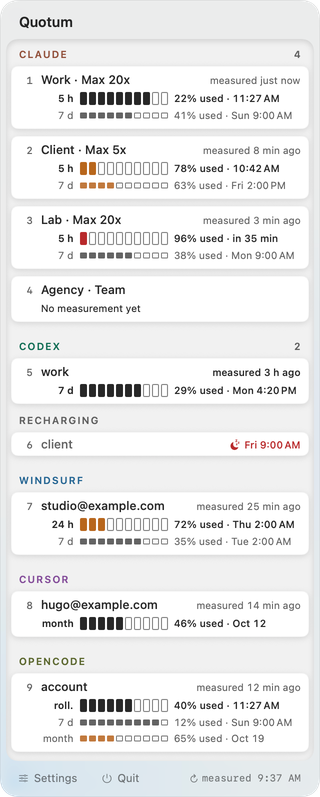



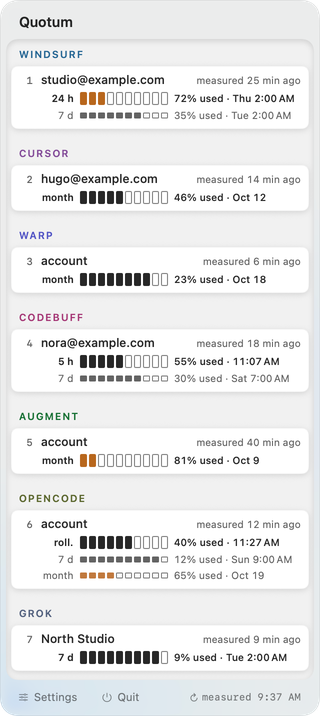
Twenty-five tools, one panel
Claude · Codex · Devin Desktop (formerly Windsurf) · Cursor · Warp · Codebuff · Augment · opencode · Grok · Grok Bot · GitHub Copilot · Kiro · Cline · Kimi Code · Kilo Code · Nous Portal · JetBrains AI · Factory Droid · Muse Code · Antigravity · Doubao · Model Studio (Alibaba Cloud) · Amp · Z.ai · MiniMax
Each account gets its own line, under its tool. Claude, Codex, Devin Desktop and Cursor take several accounts each: work, client, side project. With the panel open, ⌘1 to ⌘9 unfold the first nine.
How the accounts stay apart, each with its own app and terminal: multiple accounts on one Mac.
One line per quota window
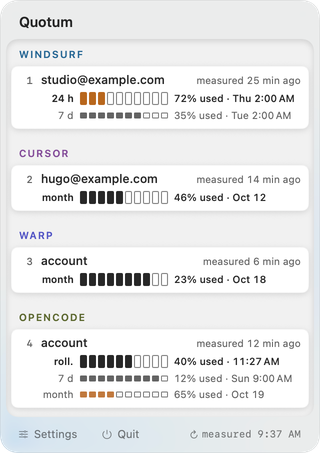
A five-hour session and a seven-day week are two limits, so they get two lines. A week at 91% no longer hides a session at 7%.
Each line gives the share used and when it resets. Next to each name, how long ago the account was measured. Nothing measured yet means no gauge, never a made-up one.
When a week runs dry
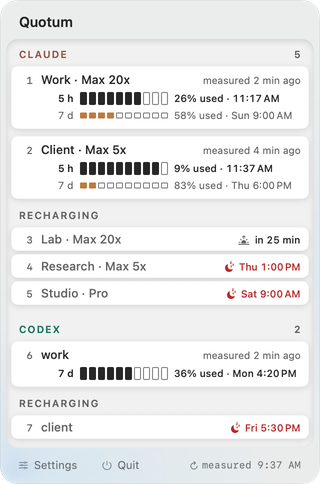
A used-up week blocks an account, even if its five-hour window looks full. Quotum folds it into one line under “Recharging”, with a moon and the time it comes back.
In the last hour, the moon becomes a sunrise. Click the line to see every window again.
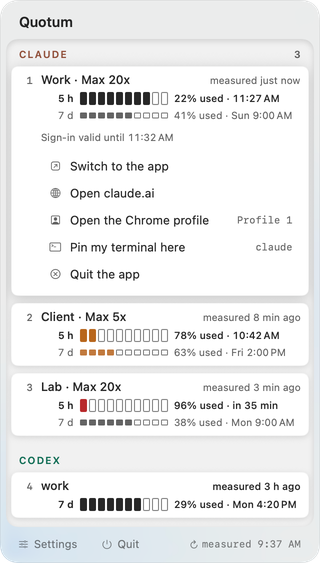
The right account, in one gesture
Open a Claude or Codex account and act on it: its own copy of the desktop app, claude.ai or chatgpt.com in its Chrome profile, or your terminal pinned to it.
If Chrome is already running, Quotum says so instead of opening the wrong profile.
- 12tools read
- 1line per quota window
- 0tools tracked at installation
- €4.99once, no subscription
You choose what it tracks
Nothing is tracked when you install Quotum. A tool's credentials are read, and requests go to it, only once you pick it in “Choose the tools to track”.
Six local sources are read whether tools are tracked or not, among them the end of the Codex CLI session logs, which are the transcripts of your sessions. Every file, request and exception is listed on What Quotum reads on your Mac.
Reading these tools' quotas is not something their publishers provide for. The Pricing page explains the risk to your accounts before any purchase.
Codex resets
Quotum shows the resets a Codex account has left and can spend one with “Spend a reset”: by hand after a second confirmation, or on its own if you turn that setting on. It is off by default.
Either way, it acts only on a measurement at most ten minutes old, once the server has observed that the quota is exhausted. It is the only thing Quotum ever writes to an account. Codex resets.
Menu, settings, license
A right-click on the icon gives the license status and version, Check for Updates…, Enter My Key…, Settings and Quit. Quotum measures every one, five or fifteen minutes. A license key activates a Mac once, then works offline.
How Quotum compares
Several menu bar trackers measure Claude and Codex well, some for free. Quotum adds:
- Measurement and action on the same account: its app, its Chrome profile, your terminal.
- Warp without an API key, read from the Keychain.
- Devin Desktop (formerly Windsurf), Warp, Codebuff and Augment, which most trackers we compared leave out.
- One price, once: €4.99 with every account included.
Others track far more tools, publish their code or run on older versions of macOS. The side-by-side comparison sets out both sides, with sources and the date of each check.
Price
€4.99
One-time purchase, perpetual license
The trial lasts fourteen days and covers the first two lines of the panel. You decide on the purchase on the Pricing page, where the warning about third-party provider accounts comes before any purchase.
Homebrew installs the same app, which then keeps itself up to date.
FAQ
How do I see my Claude Code usage on a Mac?
Install Quotum, choose Claude in “Choose the tools to track”, and the menu bar shows what is left in the five-hour and seven-day windows of the account Claude Code is signed in to, with the time each one resets. Other Claude accounts show a figure whenever one is available, with its age.
Does it work with the Codex CLI and ChatGPT accounts?
Yes. Codex accounts show their seven-day window, the resets available, and the age of the figure. The account the Codex CLI is signed in to is measured on request.
When do my Claude and Codex limits reset?
Each window has its own schedule: Claude's five-hour session and its weekly window, and the weekly window of Codex. Every measurement comes with the time its window resets, and Quotum writes that time on the window's line, so you know when an account comes back without opening its settings.
Does Codex have a 5-hour limit?
It depends on the plan. On the Codex plans we measured in September 2026, only the weekly window was published. When an account does publish a five-hour window, Quotum shows it on its own line; it never shows a window the tool does not publish.
Is there a Claude usage widget for the Mac menu bar?
Quotum is one: a macOS menu bar app that shows the remaining usage of Claude Code, Codex, Cursor and other AI coding tools, for several accounts, with the age of each measurement. Other menu bar trackers exist, several of them free, and the comparison above sets them side by side.
Is it real time?
No, and it says so. Quotum measures every five minutes by default, and some figures come from a tool's last request. That is why each account shows how long ago it was measured.
Does it need an API key or browser cookies?
No browser cookie, and no API key, except for two tools and for tracking spend if you choose to. Quotum reads the sign-ins your tools already keep on your Mac, in the Keychain or in their configuration files, or runs a tool's own command-line tool, read-only, and only for the tools you choose to track. Z.ai and MiniMax are the exceptions: they are tracked with a key you paste, which Quotum keeps in its own Keychain item and sends only to that tool's quota server. Spend is also read with a key you paste: a Claude Enterprise admin key, or an AWS or Azure read-only identity for a cost budget.
Can it switch the account Claude Code uses?
Not the account a tool is signed in to: Quotum writes none of their credentials. It pins your terminal to an account instead, and opens that account's own copy of the desktop app.
Which Macs does it run on?
Macs with macOS 26 or later, Apple Silicon or Intel. Earlier versions of macOS are not supported.
See what your accounts have left
Fourteen days free, on the first two lines of the panel. Launch price: €4.99, then €9.99.
Guides: check your Claude usage · check your Codex usage · Claude Pro vs Max · Codex vs Claude Code · Claude usage tracker · Codex usage tracker